Is YouTube Shorts Safe
for My Child?
Your child does not have TikTok — but YouTube Shorts IS TikTok. Same autoplay, same infinite scroll. In 2024, a US federal judge found YouTube liable for recommending harmful content to children. Here is what you need to know.
views worldwide
You have probably noticed something
You do not need to check every box. One is enough to know this page is for you.
What Makes YouTube Shorts Dangerous?
Are YouTube Shorts bad for kids? More than most parents realise. YouTube Shorts is not regular YouTube. It is a separate infinite-scroll feed inside the YouTube app — powered by a recommendation algorithm that decides what your child sees next. There is no playlist. No end point. No natural moment to stop. The format is identical to TikTok, and in 2024, a US federal judge found YouTube liable for recommending harmful content to minors.
Infinite Scroll with No End
Unlike a TV show with credits or a game with match endings, Shorts has no stopping cue. Each video auto-plays into the next. The scroll never ends — and your child’s brain never receives a signal to stop.
Algorithm-Driven Content
Every swipe teaches the algorithm what holds your child’s attention. Within minutes, it builds a profile. Within hours, it serves content optimised to maximise watch time — not content that is good for them.
Hidden Inside “Safe” YouTube
Most parents gave their child YouTube access for educational content or music. Shorts arrived without warning, embedded inside the same app. Your child did not download a new app — the app changed around them.
Content Moderation Fails
Restricted Mode was built for regular YouTube search results, not for the Shorts algorithm. Violent, sexual, and disturbing content regularly appears on Shorts feeds even with Restricted Mode enabled.
Why Can’t My Child Stop Watching?
YouTube Shorts is addictive by design. Short-form video triggers dopamine release every few seconds — the same brain reward system affected by gambling. Research from Nature Scientific Reports (2024) found that short-form video users show altered brain activity patterns in reward centres, similar to behavioural addictions. Your child is not weak. They are fighting product design built by hundreds of engineers.
Variable Reward (Slot Machine Effect)
Not knowing what the next video will be — funny, shocking, interesting — creates the same unpredictability that makes gambling compelling. Brown University researchers confirmed this uncertainty is more addictive than predictable rewards.
No Natural Exit Point
A 2024 study from Tianjin Normal University found infinite scroll users watched 35% longer than those with pagination. The design removes every cue your brain would normally use to decide “I am done.”
Rapid-Fire Dopamine Hits
Each 15-60 second video delivers a micro-reward. Your child’s brain receives more dopamine spikes in 10 minutes of Shorts than in an hour of regular YouTube. This is why long-form content starts to feel “boring.”
Attention Span Rewiring
The brain adapts to expect constant novelty. A child who watches Shorts regularly develops a lower threshold for boredom. Homework, reading, and even conversation feel understimulating by comparison.
A longitudinal fMRI study (2025) found that 72-hour screen restriction showed brain activity changes “that may reflect withdrawal-related processes.” The irritability you see when you take the phone away is neurochemical, not personal.
New YouTube Shorts Parental Controls
In January 2026, YouTube introduced the ability for parents to set daily time limits on Shorts or block them entirely through supervised accounts. You can now set Shorts scrolling from zero to 120 minutes per day using Family Link. These are the strongest short-form video controls on any platform — but they only work within a supervised account.
Open Google Family Link
Open the Family Link app on your phone. If your child does not have a supervised account yet, create one first — this is essential for any controls to work.
Navigate to YouTube Controls
Tap your child’s account → Controls → Content restrictions → YouTube.
Set the Shorts Feed Limit
Choose “Time management” and set the daily Shorts limit from 0 to 120 minutes. Setting it to zero lets you block YouTube Shorts entirely while keeping regular YouTube available.
Enable Restricted Mode
In the YouTube app: profile icon → Settings → General → Restricted Mode → On. Imperfect, but worth enabling alongside the Shorts limit.
Use YouTube Kids for Under-13s
Does YouTube Kids have Shorts? No. YouTube Kids does not include Shorts. It is genuinely curated for children. The limited content is a feature, not a bug.
Why these controls are a start, not a solution. These tools manage access — they do not address why your child cannot stop scrolling. They do not fix the meltdowns when the timer runs out. And they do not help when your child creates an unsupervised account, uses a friend’s phone, or finds workarounds. In my experience, parental controls are about 5% of the solution.
You have now got the technical options. But here is what I have learned from helping families navigate short-form content:
- Stop workarounds — The new 2026 controls work on supervised accounts. But children who create unsupervised accounts, use a friend’s phone, or sign out can bypass every technical restriction.
- Stop the algorithm from learning — Every swipe teaches it what keeps your child watching. Restricted Mode does not stop this learning process.
- Reverse attention span damage — Short-form content trains the brain to expect constant novelty. Settings can limit exposure, but they cannot undo what has already happened.
- Fix “time blindness” — The way 5 minutes becomes 50 without them noticing. That is the product working as designed. Reminders do not address why it happens.
- Teach them to recognise manipulation — Understanding WHY the feed is designed this way is what builds real digital literacy. Settings just restrict — they do not educate.
YouTube Shorts vs TikTok vs Instagram Reels
YouTube Shorts now has the strongest parental controls of any short-form video platform. But the core risk — infinite scroll feeding an algorithm that learns what holds your child’s attention — is identical across all three. Switching platforms does not solve the problem.
| YouTube Shorts | TikTok | Instagram Reels | |
|---|---|---|---|
| Set daily time limit on short videos | Yes (0–120 min) | Device-wide only | Device-wide only |
| Block short videos entirely | Yes (set to 0 min) | No | No |
| Parent-managed supervised account | Yes (Family Link) | Yes (Family Pairing) | Limited |
| Content filtering | Restricted Mode | Restricted Mode | Sensitive Content |
| Bedtime / break reminders | Yes (customisable) | Yes | Yes |
| Infinite scroll algorithm | Yes | Yes | Yes |
| Minimum age | 13 (or supervised) | 13 | 13 |
Better controls do not mean safe. Children who cannot self-regulate on one short-form platform will struggle on all of them. The format is the problem — not the brand name on the app.
Is My Child Addicted to YouTube Shorts?
Not every child who watches Shorts is addicted. But if they genuinely cannot stop despite wanting to, if they are angry when you intervene, and if Shorts is displacing sleep, school, or friendships — these are warning signs. The key question: is Shorts enhancing their life or taking from it?
- Exposure to violent, sexual, or disturbing content
- Imitating dangerous “challenges” from Shorts
- Using YouTube late into the night
- Complete inability to stop when asked
- Content affecting their beliefs or behaviour dramatically
- Losing hours without realising (“time blindness”)
- Irritable or agitated when Shorts is restricted
- Declining interest in longer-form content
- Cannot watch a full YouTube video anymore
- Shorts is first app opened, last closed
- Prefers Shorts to regular YouTube
- Talks about viral Shorts constantly
- Underestimates their usage time
- Gets defensive when you check history
- Scrolling Shorts while doing homework
Why Does My Child Get Angry When I Turn Off YouTube?
The anger is a withdrawal response. When dopamine supply cuts off abruptly, the brain protests. The American Academy of Pediatrics notes these reactions mirror mild withdrawal symptoms. It is not defiance — it is their brain chemistry adjusting.
The dopamine crash. Gaming and short-form video flood the brain with dopamine. Stopping abruptly creates a crash. A 2025 Talker Research survey found 62% of children have meltdowns specifically when asked to stop watching videos — the highest trigger across all screen activities.
No transition preparation. Unlike activities with natural endings, Shorts provides no winding-down period. The brain shifts from high stimulation to zero instantly.
Fight-or-flight activation. For children who have become dependent, stopping feels threatening. Their stress response activates, which looks like anger but is actually anxiety.
Give 10-minute warnings. Agree on stopping points before screen time starts. Use a transition activity (walk, snack, music) to ease the brain out of high-stimulation mode. These small changes can transform daily battles into manageable transitions.
What Age Is Appropriate for YouTube Shorts?
Under 13: Use YouTube Kids only (no Shorts access). Ages 13-15: Main YouTube with Restricted Mode, supervised account, Shorts time limits, and regular check-ins. Ages 16+: More autonomy with demonstrated algorithm awareness. Watch for “time blindness” regardless of age.
Under 13 — YouTube Kids Only
No Shorts access. Device-level time limits. Watch in shared spaces. Parent-approved channels only. YouTube Kids does not have Shorts — this is the safest option.
Ages 13-15 — Supervised Access
Restricted Mode on and locked. Shorts limit of 30-60 minutes via Family Link. Weekly watch history review together. Ongoing conversations about how algorithms work.
Ages 16+ — Building Independence
Restricted Mode optional. Self-managed time with check-ins. Algorithm awareness conversations. Watch for compulsive patterns — age does not make anyone immune to infinite scroll.
What most guides miss: These are general guidelines. What actually works depends on your child’s maturity, whether they have ADHD or autism (short-form content hits neurodivergent children harder), what has already happened, and your family’s communication style. A system they helped design is more likely to stick than one imposed on them.
What the Data Actually Shows
Insights from Daniel’s 12 years working in London schools
When Should I Be Worried About YouTube Shorts?
How bad is YouTube Shorts for your child? These patterns tell you. They appear across all short-form content — TikTok, Instagram Reels, and Shorts. If you are seeing them, the specific platform is less important than the underlying relationship with short-form content.
Time Blindness
Five minutes becomes fifty without them noticing. They genuinely do not know how long they have been scrolling. This is the product working as designed — not your child being dishonest.
Attention Span Collapse
They cannot sit through a 10-minute YouTube video, a TV episode, or a conversation without reaching for their phone. Shorts has trained their brain to expect constant stimulation.
Deceptive Behaviour
Hiding usage, lying about screen time, sneaking devices at night, creating unsupervised accounts. In Daniel’s classroom surveys, 50% of 10-11 year olds would not tell their parents if something worried them online — scared they would be in trouble.
Impact on Daily Life
Declining school performance, sleep disruption, social withdrawal, loss of interest in hobbies they previously enjoyed. When Shorts starts taking from their life rather than adding to it, it is time to act.
Here is what gives me hope: YouTube actually has some of the best parental tools available — Family Link, Restricted Mode, and YouTube Kids. Every family I have worked with who has set these up properly has found the right balance between educational content and mindless scrolling.
Why I take YouTube Shorts so seriously
Most parents don't think twice about YouTube. Their child has used it for years. But YouTube Shorts is a different product hiding inside the same app — an infinite scroll feed driven by the same kind of algorithm that makes TikTok so hard to put down.
Daniel Towle — Screen Time Specialist, Washington Post FeaturedMore from the Social Media Series
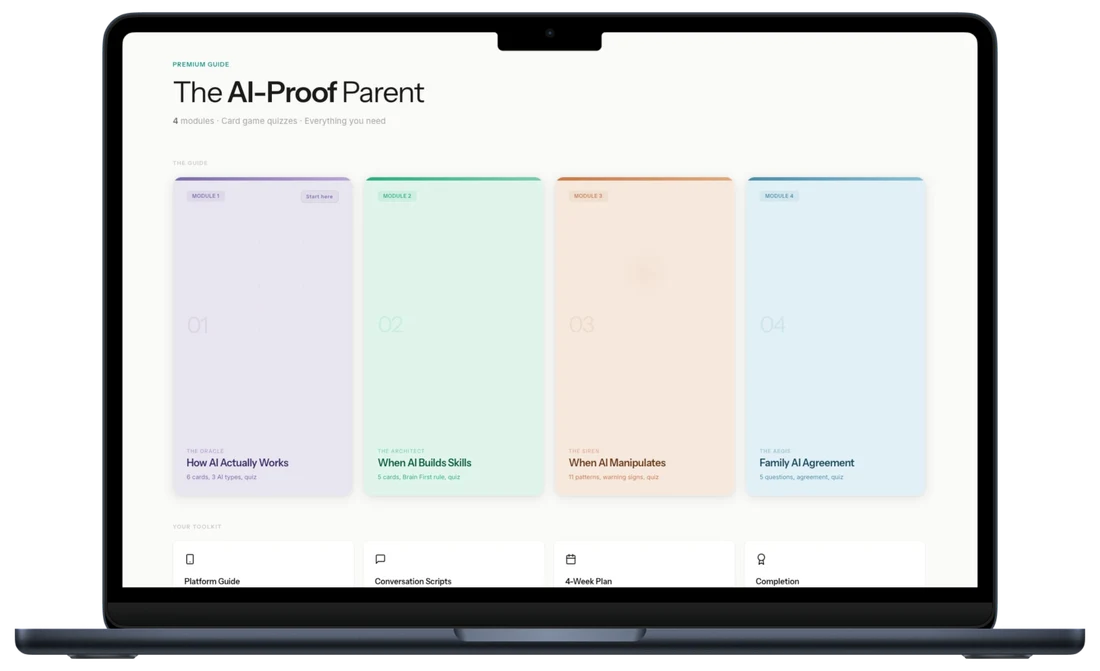
YouTube Shorts, TikTok, Instagram — every platform your child uses is engineered to maximise attention. This guide breaks down exactly how AI-driven algorithms target children and gives you the conversations, boundaries, and action plan to protect them.
Want personalised help instead?
The guide gives you the system. A session gives you a plan built around your child, your family, and your specific situation. One call. 45 minutes. Everything changes.
Your Questions Answered